


 //目前功能:编辑、排序、单选项、复选项、合并单元格、产生序列号、联动下拉框、删除、超连接、鼠标移动改变颜色、奇偶项颜色区分、排序、分页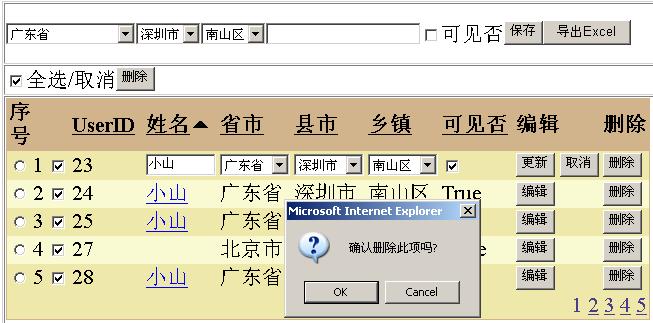
1.html代码
<HTML> <HEAD> <title>DatagridTest</title> <meta content="Microsoft Visual Studio .NET 7.1" name="GENERATOR"> <meta content="C#" name="CODE_LANGUAGE"> <meta content="JavaScript" name="vs_defaultClientScript"> <meta content="http://schemas.microsoft.com/intellisense/ie5" name="vs_targetSchema"> <script language="javascript">

 function fun_option(obj)
 { document.Form1.hiduserid.value=obj.value;
 } function chkAll_true() { var chkall= document.all["chkAll"]; var chkother= document.getElementsByTagName("input"); for (var i=0;i<chkother.length;i++) { if( chkother[i].type=='checkbox') { if(chkother[i].id.indexOf('chkExport')>-1) { if(chkall.checked==true) { chkother[i].checked=true; } else { chkother[i].checked=false; } } } } } function Delete() { var al = new Array(); var chkother= document.getElementsByTagName("input"); for(var i=0,j=0;i<chkother.length;i++) { if( chkother[i].type =='checkbox') { if(chkother[i].id.indexOf('chkExport')>-1) { if(chkother[i].checked==true) { al[j] =chkother[i].value; j++; } } } } if (al == "") { alert('You need to select a row in the list before selecting Delete.\r\nPlease select a row and try again.'); } else if (window.confirm("Are you sure to delete all these?")) { var deleteID='<%=btndelete.ClientID%>'; window.document.all(deleteID).click(); } else { return false; } }
 </script> </HEAD> <body> <form id="Form1" method="post" runat="server"> <TABLE id="Table1" height="100%" cellSpacing="1" cellPadding="1" width="100%" border="1"> <tr> <td><asp:dropdownlist id="DropDownList1" runat="server" AutoPostBack="True"></asp:dropdownlist><asp:dropdownlist id="DropDownList2" runat="server" AutoPostBack="True"></asp:dropdownlist><asp:dropdownlist id="DropDownList3" runat="server"></asp:dropdownlist><asp:textbox id="TextBox1" runat="server"></asp:textbox><asp:checkbox id="CheckBox1" runat="server" Text="可见否"></asp:checkbox><asp:button id="Button1" runat="server" Text="保存"></asp:button><asp:button id="Button2" runat="server" Text="导出Excel"></asp:button></td> </tr> <tr height="30"> <td><INPUT id="chkAll" onclick="chkAll_true()" type="checkbox">全选/取消<asp:button id="btndelete" runat="server" Text="删除"></asp:button></td> </tr> <TR vAlign="top"> <TD width="100%" colSpan="5"><asp:datagrid id="DataGrid1" runat="server" OnDeleteCommand="Delete" ForeColor="Black" GridLines="None" CellPadding="2" BackColor="LightGoldenrodYellow" BorderWidth="1px" BorderColor="Tan" AllowSorting="True" AutoGenerateColumns="False" DataKeyField="UserID" OnUpdateCommand="Update" OnCancelCommand="Cancel" OnEditCommand="Edit" PageSize="5" AllowPaging="True"> <FooterStyle BackColor="Tan"></FooterStyle> <SelectedItemStyle ForeColor="GhostWhite" BackColor="DarkSlateBlue"></SelectedItemStyle> <AlternatingItemStyle BackColor="PaleGoldenrod"></AlternatingItemStyle> <HeaderStyle Font-Bold="True" BackColor="Tan"></HeaderStyle> <Columns> <asp:TemplateColumn HeaderText="序号"> <HeaderStyle Width="10px"></HeaderStyle> <ItemTemplate> <INPUT id=radio onclick=fun_option(this) type=radio value='<%# DataBinder.Eval(Container.DataItem,"UserID") %>' name=radio> </ItemTemplate> <FooterTemplate> </FooterTemplate> </asp:TemplateColumn> <asp:TemplateColumn HeaderText="序号"> <HeaderStyle Width="10px"></HeaderStyle> <FooterTemplate> </FooterTemplate> </asp:TemplateColumn> <asp:TemplateColumn> <HeaderStyle Width="10px"></HeaderStyle> <ItemTemplate> <asp:CheckBox id="chkExport" Runat="server"></asp:CheckBox> </ItemTemplate> </asp:TemplateColumn> <asp:BoundColumn DataField="UserID" SortExpression="UserID" ReadOnly="True" HeaderText="UserID"> <HeaderStyle Width="70px"></HeaderStyle> </asp:BoundColumn> <asp:TemplateColumn SortExpression="UserName" HeaderText="姓名"> <HeaderStyle Width="70px"></HeaderStyle> <ItemTemplate> <a href='form1.aspx?id=<%# DataBinder.Eval(Container.DataItem,"UserID") %>&name=<%# DataBinder.Eval(Container.DataItem,"UserName") %>' target="_blank"> <%# DataBinder.Eval(Container.DataItem,"UserName") %> </a> </ItemTemplate> <EditItemTemplate> <asp:TextBox id=UserName Text='<%# DataBinder.Eval(Container.DataItem,"UserName") %>' Width="100%" Runat="server"> </asp:TextBox> </EditItemTemplate> </asp:TemplateColumn> <asp:TemplateColumn SortExpression="province" HeaderText="省市"> <HeaderStyle Width="70px"></HeaderStyle> <ItemTemplate> <%# DataBinder.Eval(Container.DataItem,"province") %> </ItemTemplate> <EditItemTemplate> <asp:DropDownList id="province" Width="100%" Runat="server" AutoPostBack="True" OnSelectedIndexChanged="ddlprovince_SelectedIndexChanged"></asp:DropDownList> </EditItemTemplate> </asp:TemplateColumn> <asp:TemplateColumn SortExpression="city" HeaderText="县市"> <HeaderStyle Width="70px"></HeaderStyle> <ItemTemplate> <%# DataBinder.Eval(Container.DataItem,"city") %> </ItemTemplate> <EditItemTemplate> <asp:DropDownList id="city" Runat="server" Width="100%" AutoPostBack="True" OnSelectedIndexChanged="ddlcity_SelectedIndexChanged"></asp:DropDownList> </EditItemTemplate> </asp:TemplateColumn> <asp:TemplateColumn SortExpression="area" HeaderText="乡镇"> <HeaderStyle Width="70px"></HeaderStyle> <ItemTemplate> <%# DataBinder.Eval(Container.DataItem,"area") %> </ItemTemplate> <EditItemTemplate> <asp:DropDownList id="area" Runat="server" Width="100%"></asp:DropDownList> </EditItemTemplate> </asp:TemplateColumn> <asp:TemplateColumn SortExpression="Enabled" HeaderText="可见否"> <HeaderStyle Width="70px"></HeaderStyle> <ItemTemplate> <%# DataBinder.Eval(Container.DataItem,"Enabled") %> </ItemTemplate> <EditItemTemplate> <asp:CheckBox id=chkenabled Runat="server" Checked='<%# DataBinder.Eval(Container.DataItem,"Enabled") %>'> </asp:CheckBox> </EditItemTemplate> </asp:TemplateColumn> <asp:EditCommandColumn ButtonType="PushButton" UpdateText="更新" HeaderText="编辑" CancelText="取消" EditText="编辑"></asp:EditCommandColumn> <asp:ButtonColumn Text="删除" ButtonType="PushButton" HeaderText="删除" CommandName="Delete"></asp:ButtonColumn> </Columns> <PagerStyle NextPageText="下一页" PrevPageText="上一页" HorizontalAlign="Right" ForeColor="DarkSlateBlue" BackColor="PaleGoldenrod" Mode="NumericPages"></PagerStyle> </asp:datagrid></TD> </TR> <tr height="30"> <td></td> </tr> </TABLE> <INPUT id="hiduserid" type="hidden" runat="server"> </form> </body></HTML>using System.Data.SqlClient;using System.Text;public class DatagridTest : System.Web.UI.Page { protected System.Web.UI.WebControls.DataGrid DataGrid1; protected System.Web.UI.HtmlControls.HtmlInputHidden hiduserid; protected System.Web.UI.WebControls.Button btndelete; protected System.Web.UI.WebControls.DropDownList DropDownList1; protected System.Web.UI.WebControls.DropDownList DropDownList2; protected System.Web.UI.WebControls.DropDownList DropDownList3; protected System.Web.UI.WebControls.CheckBox CheckBox1; protected System.Web.UI.WebControls.TextBox TextBox1; protected System.Web.UI.WebControls.Button Button1; protected System.Web.UI.WebControls.Button Button2; private string constring=""; private void Page_Load(object sender, System.EventArgs e) { if(!Page.IsPostBack) { ListProvince(); ListCity(); ListArea(); btndelete.Attributes.Add("onclick","return Delete();"); SortExpression=""; sort="desc"; DataBind(); } }
 DataBind Web Form Designer generated code GetDataSet DataGrid1_ItemDataBound DataGrid1_SortCommand DataGrid1_ItemCreated property Edit Cancel Update Delete event ddlprovince_SelectedIndexChanged ddlcity_SelectedIndexChanged btndelete_Click delete ListProvince ListCity ListArea save private void DropDownList1_SelectedIndexChanged(object sender, System.EventArgs e) { ListCity(); } private void DropDownList2_SelectedIndexChanged(object sender, System.EventArgs e) { ListArea(); } private void Button2_Click(object sender, System.EventArgs e) { ToExcel(this.DataGrid1,"meng"); } ToExcel private void DataGrid1_PageIndexChanged(object source, DataGridPageChangedEventArgs e) { this.DataGrid1.CurrentPageIndex=e.NewPageIndex; DataBind(); } }
3. 数据库教本(或下载真实数据/Files/singlepine/area.rar)
if exists (select * from dbo.sysobjects where id = object_id(N'[dbo].[TestGrid]') and OBJECTPROPERTY(id, N'IsUserTable') = 1)drop table [dbo].[TestGrid]GOif exists (select * from dbo.sysobjects where id = object_id(N'[dbo].[province]') and OBJECTPROPERTY(id, N'IsUserTable') = 1)drop table [dbo].[province]GOif exists (select * from dbo.sysobjects where id = object_id(N'[dbo].[city]') and OBJECTPROPERTY(id, N'IsUserTable') = 1)drop table [dbo].[city]GOif exists (select * from dbo.sysobjects where id = object_id(N'[dbo].[area]') and OBJECTPROPERTY(id, N'IsUserTable') = 1)drop table [dbo].[area]GOCREATE TABLE [dbo].[TestGrid] ( [UserID] [int] IDENTITY (1, 1) NOT NULL , [UserName] [nvarchar] (50) COLLATE Chinese_PRC_CI_AS NULL , [provinceID] [nvarchar] (50) COLLATE Chinese_PRC_CI_AS NULL , [cityID] [nvarchar] (50) COLLATE Chinese_PRC_CI_AS NULL , [areaID] [nvarchar] (50) COLLATE Chinese_PRC_CI_AS NULL , [Enabled] [bit] NULL ) ON [PRIMARY]GOCREATE TABLE [dbo].[province] ( [id] [int] NOT NULL , [provinceID] [nvarchar] (6) COLLATE Chinese_PRC_CI_AS NULL , [province] [nvarchar] (40) COLLATE Chinese_PRC_CI_AS NULL ) ON [PRIMARY]GOCREATE TABLE [dbo].[city] ( [id] [int] NOT NULL , [cityID] [nvarchar] (6) COLLATE Chinese_PRC_CI_AS NULL , [city] [nvarchar] (50) COLLATE Chinese_PRC_CI_AS NULL , [father] [nvarchar] (6) COLLATE Chinese_PRC_CI_AS NULL ) ON [PRIMARY]GOCREATE TABLE [dbo].[area] ( [id] [int] NOT NULL , [areaID] [nvarchar] (50) COLLATE Chinese_PRC_CI_AS NULL , [area] [nvarchar] (60) COLLATE Chinese_PRC_CI_AS NULL , [father] [nvarchar] (6) COLLATE Chinese_PRC_CI_AS NULL ) ON [PRIMARY]GO
【推荐】还在用 ECharts 开发大屏?试试这款永久免费的开源 BI 工具!
【推荐】国内首个AI IDE,深度理解中文开发场景,立即下载体验Trae
【推荐】编程新体验,更懂你的AI,立即体验豆包MarsCode编程助手
【推荐】轻量又高性能的 SSH 工具 IShell:AI 加持,快人一步